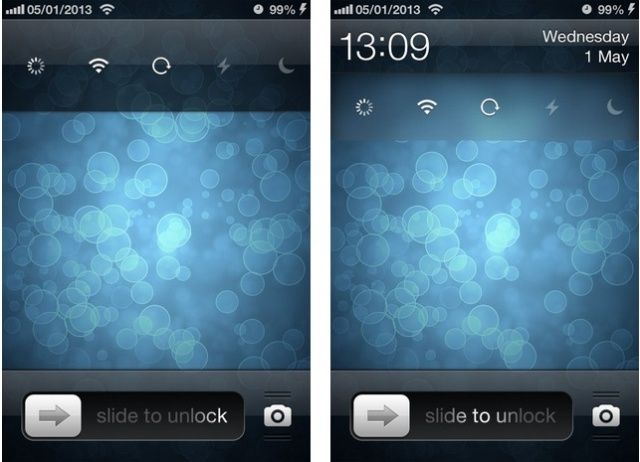
There are a number of tweaks you can install on your jailbroken iOS device that’ll add quick settings toggles to your lock screen, but some of them are far more complicated — and more ugly — than they need to be. LockscreenToggles takes the concept back to basics to ensure it isn’t one of them.
I wouldn’t say LockscreenToggles is completely perfect, but when it comes to design, it’s pretty close. The thing I like most about it is that it’s not there when you don’t need it. It hides behind the clock on your lock screen, then appears with a simple swipe when you need to change a setting.
It offers a whole host of toggles, including those for Wi-Fi, Bluetooth, Do Not Disturb, location services, airplane mode, and mobile data. It’ll even turn on your iPhone’s LED flash so that you can use it as a flashlight in the dark.
LockscreenToggles displays five shortcuts at a time, and you can either just use those, or you can activate them all and scroll between them. Check out the demonstration video below:
You can download LockscreenToggles from Cydia now, and it’s priced at $1.99.
Via: iClarified

Killian Bell is a freelance writer based in the U.K. He has an interest in all things tech and also covers Android over at CultofAndroid.com. You can follow him on Twitter via @killianbell.



One response to “New Tweak Takes Lock Screen Settings Toggles Back To Basics [Jailbreak]”
Wifi and 3G toggles in notification center? A Lock screen locks, and don’t provide the change for thieves to more easily steal your phone without being tracked.