Mobile menu toggle

Reviews - page 160

Review: Tweetie 2 is the Best iPhone App. Period.

By

post-18312-image-ef725dda92a345cfbfa8d8495dc027a2-jpg

In the world of iPhone apps, there are generally three categories of quality:

  • Crapware that you throw away a few minutes after downloading
  • Moderately useful software that you keep around but use a few times a week
  • Daily tools that become a key part of your iPhone experience

With the release of Loren Brichter’s much-anticipated Tweetie 2 for iPhone, however, I think it’s time to establish a new category: “iPhone software better than anything Apple.” In fact, I’m willing to go so far as to claim it is the single-best app ever written for the platform. It’s incredibly useful, smooth as butter, innovative in design and features, and just works as you expect that it would. It’s as if it sprung, fully formed, from the skull of the iPhone, as if to say, “This is how it should work.” Not only has Tweetie 2 raised the bar for mobile Twitter clients, it’s raised the bar for mobile software.

I’ve been playing with it non-stop since its release yesterday, so there’s a lot of ground to cover. I’m going to break this review into three major categories: Interface, Features, and Magic. Hit the jump to see it all. There’s so much to talk about!

iPhone Weekly Digest: the Return of Edge, the Bonkers Mr.AahH!!, a Great FTP App, and More!

By

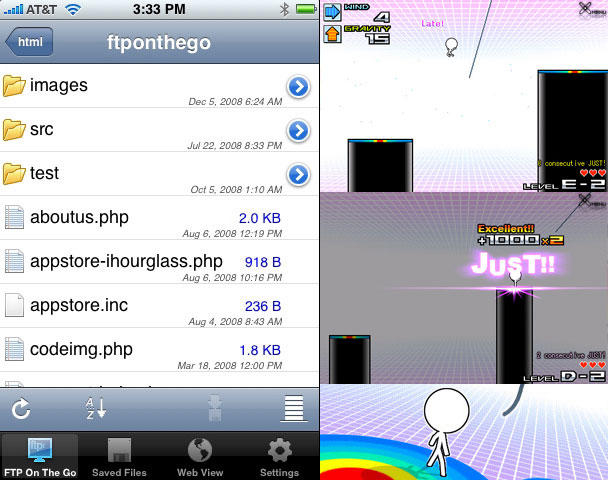
Left: FTP On The Go; right: the wonderful Mr.AagH!!
Left: FTP On The Go; right: the wonderful Mr.AahH!!

It’s Friday and it’s time for our weekly digest of tiny iPhone reviews, courtesy of iPhoneTiny.com, with some extra commentary exclusive to Cult of Mac.

Under review this week: Edge by Mobigame, Concertimatic, Juiced, Formula 1 Live Racing Free, Dude, FTP On The Go, Mr.AahH!!, Pinch n Pop!, iSplume, Edge by Mobigame Lite. As always, all id.gd links are to the relevant App Store page.

Cult of Mac Favorite: HippoRemote

By

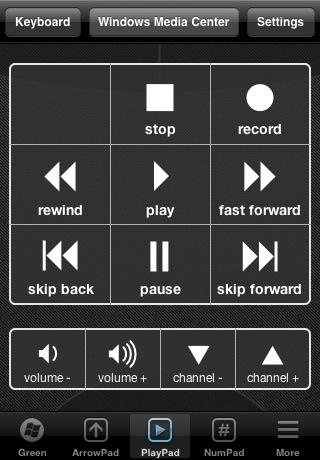
screenshot_9

What it is: HippoRemote is an incredibly powerful remote control application for iPhone that enables you to control any Mac application from across the room. Though optimized for media apps like Plex Media Server or Boxee, it can do just about anything — including launching Spotlight from the keyboard.

Why it’s cool: Because it finally puts every possible thing you could do on a Mac at your fingertips. It uses Mac OS X’s built-in Screen Sharing features to provide a very responsive multi-touch trackpad that moves around with you. It also offers a keyboard including F-keys and command keys that can be viewed in Portrait or in Landscape. It’s absolutely seamless. It also includes 23 application-specific suites of buttons, so you have video controls for iTunes or Plex movies, but audio controls when you’re just listening to a song. Other apps, most notably Rowmote Pro, offer identical functionality, but this one just feels more accurate — possibly because it uses VNC Screen Sharing instead of a third-party program. I’m actually writing this on my iPhone into my Mac right now, and there’s virtually no lag. Additionally, it’s worked without a hitch. Simply fuss free, and perfect for your living room Mac mini.

Where to get it: HippoRemote sells for $5 in the App Store.

Review: HP’s Photosmart All-In-One Is a Fanzine Publisher’s Wet Dream

By

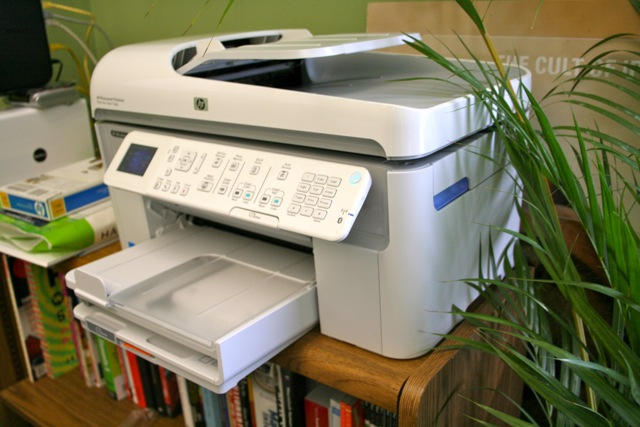
HP_Photosmart_1

The best thing about going to the office is having access to the copier in the mail room. Sneak in at the weekend, roll off hundreds of color copies for your secret art project.

But HP has a fantastic home-office alternative: the Photosmart Premium Fax All-in-One Printer, Scanner, Fax, Copier. It does everything the industrial ones do, yet costs less than $200. A snap to set up and prints from the iPhone. It’s the best printer I’ve ever had. Weird, I know, but I really do love this baby.

Hit the jump for the full review.

iPhone Weekly Digest: New Games, Sporting Apps, and a Clock Detailing DARKNESS

By

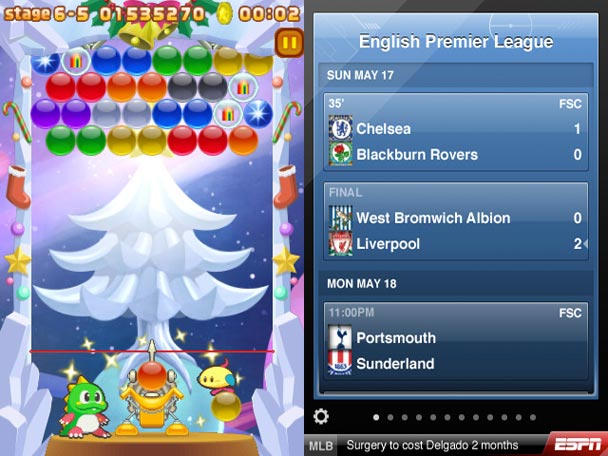
Left: Bust-a-Move/Puzzle Bobble; right: ESPN ScoreCenter

It’s Friday Sunday and it’s time for our weekly digest of tiny iPhone reviews, courtesy of iPhoneTiny.com, with some extra commentary exclusive to Cult of Mac.

Under review this week: Diorama, Bust-a-Move/Puzzle Bobble, Darkness, Nag-O-Meter Deluxe, Glypha, Rugby Zone, Otakukous and EPSN ScoreCenter. As always, all id.gd links are to the relevant App Store page.

Review: Jabra’s Radical Halo Bluetooth Headset (Verdict: It’s Stuck in Purgatory)

By

HALO 37


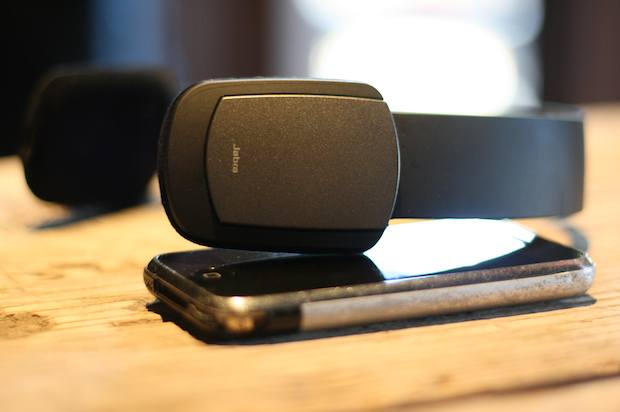
I get all tingly when a manufacturer offers up a gadget with cool features and out-of-the-box design; but then it’s a huge bummer when the gadget’s features don’t live up to expectations. Worse is when those exotic features end up being a hindrance compared with tried-and-tested ones.

And that’s exactly the case with the Jabra BT650s HALO stereo Bluetooth headset.

Full review after the jump.

Review: Why Aadvark’s iPhone App Is Great For Questions and Answers

By

post-17776-image-b1a961a7b9d537593760c6254fb908cf-jpg

Have a question? Aardvark Mobile is a great iPhone app that will find a real person to answer it – usually within minutes. It is a wonderfully useful app and has the potential to be an iPhone mainstay for years to come.

Aardvark Mobile is the latest addition to Aardvark: a social question and answer service that emerged from its beta phase earlier this year. Before Aardvark Mobile, users could only communicate with Aardvark through IM or email. The upshot of this was that if you needed a question answered from your iPhone, you had to go through your email or instant messaging app. In most circumstances you were better off finding an answer on your own using Google – even on an iPhone 2G.

But now Aardvark Mobile makes using Aardvark with an iPhone a cinch. So easy in fact, it makes Googling questions from your iPhone seem cumbersome and antiquated.

Review: Three of Crumpler’s Laptop Bags and Totes (Verdict: Names Are Bizarre, But Bags Are Tough)

By

crumpler_barney_rustle_blanket

Three’s a crowd… unless the three in question are the latest bags from hip Australian bag maker Crumpler.

Branching out from its original line of messenger bags, Crumpler now offers, amongst others, the Salary Sacrifice (a laptop rucksack), the School Hymn (a laptop clutch case) and the Barney Rustle Blanket (a messenger bag). The names are weird, but the bags aren’t.

Hit the jump for full reviews of all three.

Review: StandHear iPhone Stand Worth The Price For Headphone Splitter

By

StandHear_2

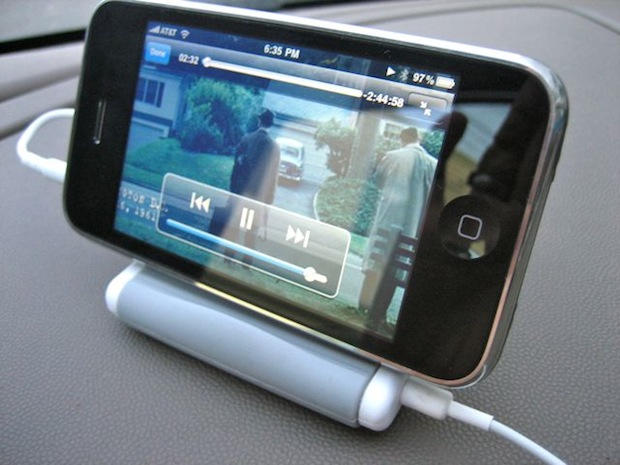
The latest release into the already crowded market of iPod/iPhone holders is the StandHear Travel Stand & Headphone Splitter from Agent 18.

The compact, fold-out case allows you to support your iPod/iPhone at four different viewing angles, leaving your hands free to do whatever they might need to be doing whilst watching your favorite movie or reviewing por… er, important documents.

Cult of Mac Favorites: “HiHowAreYou”

By

cult_logo_featured_image_missing_default1920x1080

hihowareyou-372x253

What it is: A simple puzzle platformer in which you play Jeremiah the Frog, a cheerful fellow trying to escape Satan’s curse by turning floor squares red and green with his hops — all to the music of brilliant indie rock outsider Daniel Johnston.

Why it’s cool: Didn’t you read the description? Ah, well. The play control is smooth and easy to pick up, the graphics are beautiful and cartoony, and the soundtrack is amazing. I’ve only been playing for five minutes, but I’ve already heard “Some Time Spent in Heaven.” Better still, Jeremiah is based on a mural Johnston painted in Austin, Texas, who cheerfully declares “Hi, How Are You?” to people on the campus of the University of Texas. But it’s a good game whether you know that or not.

Where to get it: On the App Store, of course. Link. It’s only 99 cents for a limited time.

Via FingerGaming

Review: Make Any Drive An Internet Drive With Seagate’s FreeAgent DockStar (Verdict: Great, With One Big Catch)

By

dockstar title 30

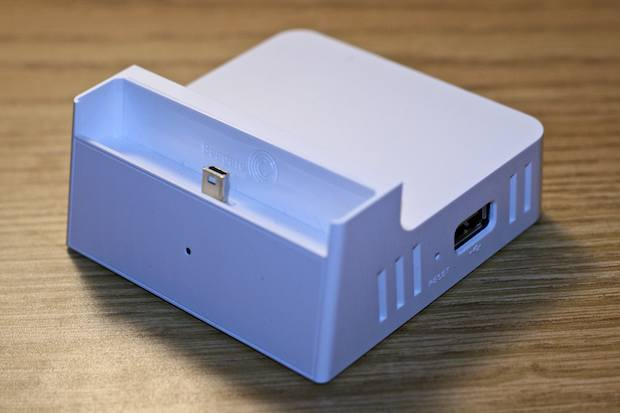
When a gadget has a doppelganger, the differences between the two are automatically thrown into sharp relief. Because Seagate’s DockStar runs on Pogoplug technology and uses the Pogoplug interface, our review of Cloud Engine’s Pogoplug a few weeks back pretty much covers the DockStar completely.

The DockStar performs the same exact function as the Pogoplug: it’s an instant, easy-to-use internet connection for any hard drive. Transfer files to a USB thumb drive or portable drive, plug it into the DockStar, then access the files from anywhere on the Internet. But there are three differences between the two products — one of them a big catch.

Hit the jump for the full skinny.

iPhone Weekly Digest: A Big Pile of Retro Games and the iPhone’s Best Clock, Now Even Better

By

ipt-20090925
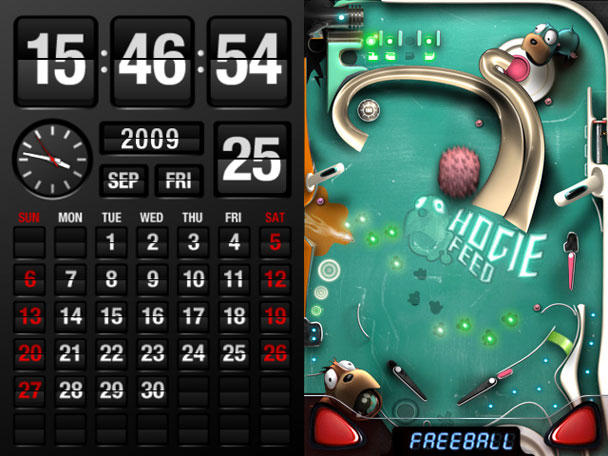
Left: FlipTime gets even better; right: Monster Pinball - how Pixar would do pinball

It’s Friday and it’s time for our weekly digest of tiny iPhone reviews, courtesy of iPhoneTiny.com, with some extra commentary exclusive to Cult of Mac.

Under review this week: Arkanoid, FlipTime 2.0, Shockwave, Squareball and Monster Pinball.

Review: Shure’s SRH440 Headphones Sound Like A Million Bucks, But Only Cost $100.

By

srh440 17

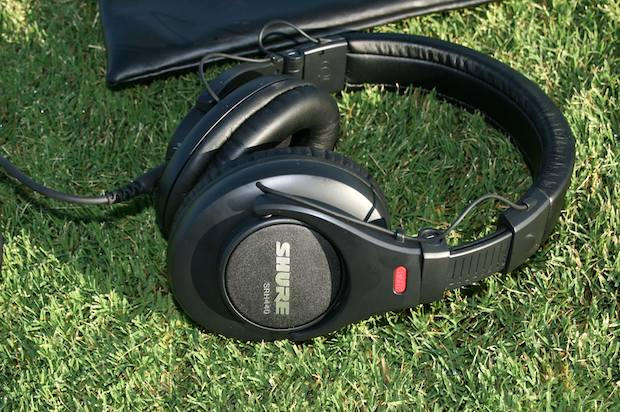
I’m going to climb out on a limb here and suggest that most people don’t use their headphones to dig trenches or compute the rotational velocity of Jupiter. No, headphones are for sound reproduction. Shure’s new SRH440 Professional Studio Headphones do nothing more or less than that, do it very well, and at the bargain price of about $100.

Full review after the jump.

Cult of Mac Favorite: Reevoo’s iPhone Site For On-The-Go Comparison Shopping

By

20090922-reevoo.jpg

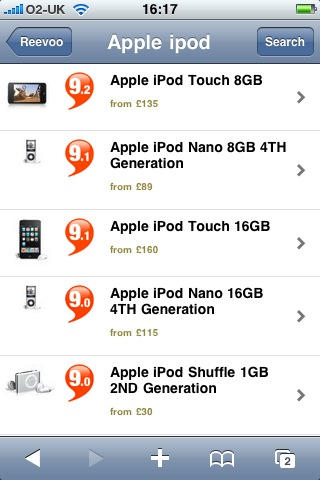
If you haven’t encountered Reevoo before, go and take a poke around it now. It’s a UK-oriented customer reviews site that’s managed to aggregate an impressively large database of real comments from real people about real products.

And the iPhone version of the site is incredibly useful when you’re out at the shops trying to track down the best product at the best price.

Gallery: Gelaskins’ Coolest New Designs

By

gelaskins.jpg
Gelaskins put fine art protection on your iPhone.

Among the many dozens (hundreds?) of companies in the cottage industry that makes cases and other protective doo dads for your iPhone, Totonto-based Gelaskins probably produces the most arresting and beautiful of them all.

Actually, just saying they produce protective devices for the iPhone is selling the company way short since they adapt fine art from a deep roster of global artists working in a broad range of styles, putting photo quality prints on thin, but tough, scratch-resistant polymer with a patented 3M adhesive, allowing you to personalize and protect everything from iPhone to the full range of Apple iPods and laptops.

The iPhone covers go for about $15, while iPod protection runs a little less and laptop protective art will set you back about $30. Not that Apple’s industrial design isn’t beautiful itself, but all the Gelaskins art is distinctive – and any of it is guaranteed to make your device stand out from the crowd.

Hit the jump for a gallery of 10 of the newest designs that we think are among the coolest.

iPhone Weekly Digest: Updated Arcade Classics, Handy Utilities, and a Map of Brussels

By

THIS is how you revamp an ageing arcade classic.

It’s Friday and it’s time for a weekly digest of tiny iPhone reviews, courtesy of iPhoneTiny.com, with some extra commentary exclusive to Cult of Mac.

This week, I review Smart Maps – Brussels, Who’s Buying, Tasks – Tick If Off, Pac-Man Remix, FortuneBall, Mr.AahH!! Lite, Space Invaders Infinity Gene, A Quest of Knights Onrush, Power Toppler, and CrunchUrl.

Review: Hellolulu Laptop Messenger Bag (Verdict: The Ultimate Laptop Bag)

By

hellolulu_messenger

Even though there is something awkward and unattractive about laptop bags, I seem drawn to them over and over. I guess it’s because when it comes to carrying a laptop, they do the job. I have been through several at this stage, but never liked any of them. But finally I have found a bag that changes the message — Hellolulu’s Messenger Bag.

The $120 Hellolulu messenger is the ultimate laptop bag. There is nothing cumbersome about this bag.

Kirikae: Jailbreak App Switcher for iPhone, iPod Touch

By

taskmanager

Kirikae, a free jailbreak app switcher/launcher for the iPhone, is yet another forbidden app that shows exactly how simple power features can drastically improve the iPhone user experience. With two clicks of the home button you can switch between apps while automatically backgrounding the app you leave. Kirikae was initially released on September 7, and the recent update (version svn.r49) adds more great features to an already killer app switcher.

Review: Audio-Technica’s QuietPoint ATH-ANC7b Noise-Cancelling Headphones Are Real Beauties

By

quietpoint

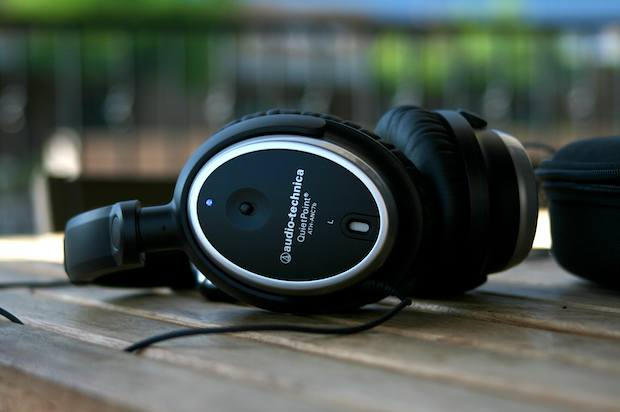
Unfortunately, Audio-Technica’s $220, noise-cancelling beauties have turned me into a complete twit. They’ve caused me to belt out John Legend’s “If You’re Out There” while in line at the local Starbucks; and they make make me look like Lando Calrissian’s crony in The Empire Strikes Back

I don’t care. They’re so good, I’m probably never taking them off.

iPhone Weekly Digest: Two Weeks for the Price of One! Best iPhone Clock, Fab Music Toy, and More!

By

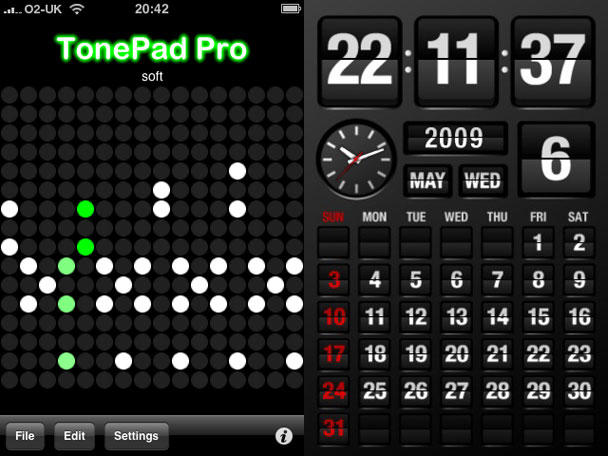
Left: TonePad Pro. Right: FlipTime. Both: really good.

It’s Friday and it’s time for our weekly digest of tiny iPhone reviews, courtesy of iPhoneTiny.com, with some extra commentary exclusive to Cult of Mac. Except this article didn’t show up last week, due to me ending up in Belgium, so this time it’s a one-off, extra-special iPhone Fortnightly Digest!

APPS OF THE WEEK

TonePad Pro: Addictive grid-based musical toy. Many editing/sharing options. Ringtone exports a tad distorted. 5/5 $0.99 https://is.gd/36AZt

FlipTime: Cute clock/calendar akin to old-style airport/train station boards. Lsc. & portrait modes. No alarm. 4/5 $0.99 https://is.gd/2NJnC

Terminator: Death Valley 1: So-so ‘humanoid killer robots’ vs contemporary ‘human cannon fodder’ comic. Nice UI. 2/5 Free https://is.gd/2JTvQ

Remix David Bowie – Space Oddity: Simple but limited multitrack ‘mixing’ of a famous Bowie track. 3/5 $1.99 https://is.gd/2LtRo

Adrenaline: 32 basic, quickfire ‘blitz’ games. Sometimes fun but would benefit from much shorter level times. 3/5 $0.99 https://is.gd/2Qryw

Leaves: Tranquil leaves-based toy. Slightly iffy 3D and physics, but calming, and fun for a short time. 2/5 $0.99 https://is.gd/30cmL

Score-Em: Virtual scorecard app with varied graphics and relevant audio. Works fine, but throwaway in nature. 2/5 $0.99 https://is.gd/32bBx

Gem Ninja: Mindless prod-based tile-match game. OK for a free time-waster, but not worth paying for. 2/5 Free https://is.gd/32cQy

Looptastic Electro Edition Lite: Loop remix tool. Fantastic UI, varied audio stems, and ten loops to play with. 4/5 Free https://is.gd/34Hp2

StarTime: Vibrant, bold Star Trek-like clock. Optional random sounds & can run iPod music in background. 3/5 $0.99 https://is.gd/39xOi

Since this column didn’t happen last week, it’s only fair to highlight FlipTime, which would have been ‘app of the week’ last week. It’s one of those apps that shows you don’t need something that’s all-singing and all-dancing to make an impression. Instead, charm sometimes goes a long way. All FlipTime does is show the time and date, sporting a visual appearance like those old-fashioned flip boards you’d see at railway stations and airports. Sounds are optional and the numerals are bold enough to see at a distance. Aesthetically, it’s also the nicest iPhone clock I’ve seen.

TonePad Pro is this week’s favourite. It’s been described as iPhone musical crack elsewhere, and it does have a certain addictive quality about it. Again, it’s a simple app—this time, you toggle grid spaces to play notes in an ever-repeating loop. However, this time it’s the attention to detail that wins through, the developer having provided plenty of options for editing, saving and sharing your creations. The Pro version is ad-free and enables you to email ringtones that can then be dropped into iTunes and synchronised with your iPhone. But if you don’t care about ringtones and ads, the free version of TonePad is just as good.

Follow iPhoneTiny on Twitter, or visit iPhoneTiny.com

Review: iPod Nano 5G Is So Good, You’ll Want to Eat It

By

ipod_nano_5G_33

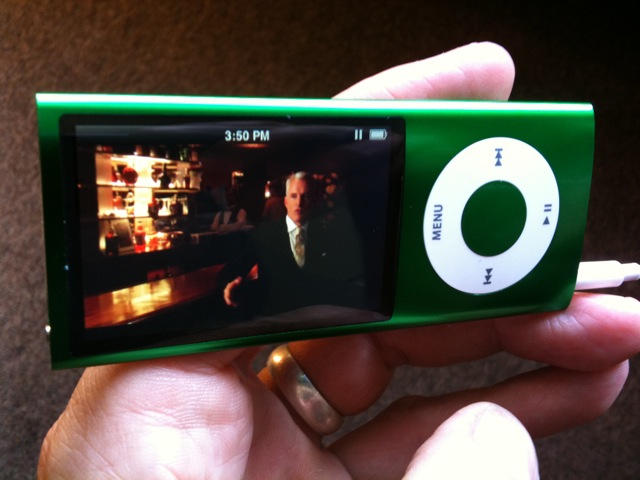
Apple’s new fifth-generation iPod nano, now with a video camera, is a perfect pearl of 21st-century technology. It’s a lovely piece of electronic jewelry that does almost everything except dispense pints of beer.

It can record video, play movies, store weeks’ worth of music, wake you in the morning, remind you of a dental appointment, record how many steps you walked to work, and how long it took you. It remembers all your contacts, records voice memos, stores your shopping lists and plays a bunch of games that are controlled by tipping and tilting the beautiful little device.

It’s easy to get complacent about Apple’s iPods, new ones come out so often. They’ve got to be 3D holographic auto-mastubators to get anyone’s attention. But take a step back, and it’s pretty astonishing how much advanced technology is stuffed into such a tiny device, and how beautifully it’s done.

Review: Altec Lansing’s Mix Boombox for the iPhone (Verdict: It Rocks)

By

mix_imt800_11

When i was younger I worked as a house painter and had a great JVC boombox that blasted punk tunes to everyone’s annoyance.

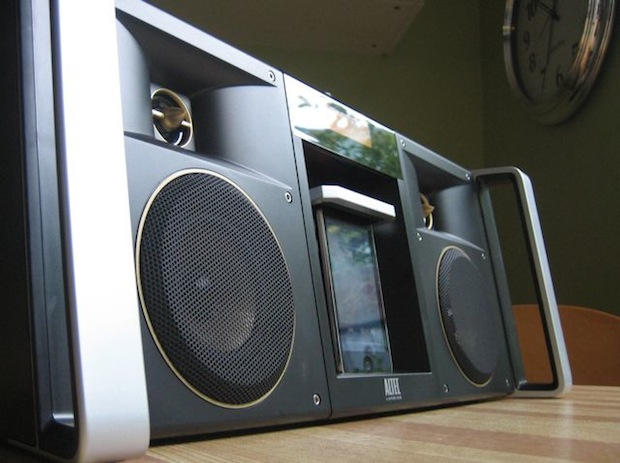
That’s why I like Altec Lansing’s new $300 Mix iMT800, a ghettoblaster for the iPhone age.

The Mix Boombox is loud and obnoxious, like a boombox should be. It mixes old school block-rockin’ beats with new school digital connectivity. It easily fills a room with sound and can piss off the neighbors, even in the daytime.