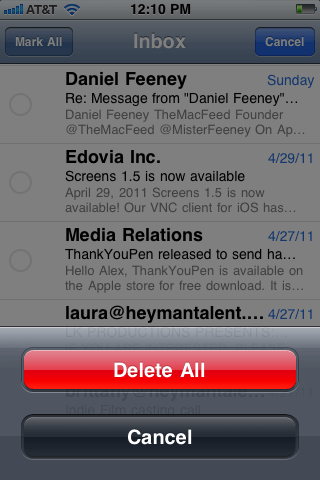
One of the biggest niggles with the iOS Mail application – for me – is that in order to delete multiple emails at once, you need to go through and select each individual message before you hit the delete button. I think that kind of defeats the object of having a multiple delete function; you might as well just delete them individually if you’ve got to touch them all anyway. However, a new jailbreak tweak called DeleteMail offers a solution to this problem.
Developed by Andrea Oliva, and now available in Cydia for $0.99, DeleteMail allows you to delete every single email in a particular mailbox in just two taps.
httpv://www.youtube.com/watch?v=jZ4L8EKoKGw&feature=player_embedded
While this isn’t the perfect solution to deleting multiple emails, it’s certainly a great little tweak for many users. If – like me – you have a secondary email account you use for all of the services you know will send you a shed-load of junk mail, you’ll often look at a mailbox full of over 50 newsletters, special offers and other complete rubbish. Now it’s quick and easy to delete them all.
[via iPhone Download Blog]

Killian Bell is a freelance writer based in the U.K. He has an interest in all things tech and also covers Android over at CultofAndroid.com. You can follow him on Twitter via @killianbell.



4 responses to “Delete All of Your Junk Mail in Two Taps with ‘DeleteMail’ for iPhone”
Do you always feed iDB page views?
Well, I’m a keen iDB follower – they post some good jailbreak news. It’s unfair to use their news without crediting them. I certainly don’t like it when other sites use my material without linking back.