Mobile menu toggle

Top Stories

Read Cult of Mac’s latest posts on Top Stories:

Digitize documents and images with the best scanners for Mac

By

Best scanners for Mac - Fujitsu ScanSnap iX1600
A great all-around scanner for Mac is Fujitsu's flagship model, ScanSnap iX1600.
Photo: Cult of Mac/Fujitsu

In an increasingly digital world, scanners remain crucial tools for digitizing hard-copy documents, receipts, photos and more. For Mac users, whether at home or on the go, finding the best scanners for Mac can really boost your productivity.

Choosing the best scanner for Mac depends on your specific needs and budget. Whether you need a portable scanner for use anywhere, a high-speed scanner for tons of documents or a versatile scanner for various document types like receipts and ID cards, there’s one out there for you.

These days, most scanners are compatible with Mac and Windows, as are all of our choices below. This guide focuses on helping you find the best scanner for your Mac, considering factors like resolution, speed, cost and additional features.

Power up with a 1st Gen Apple MagSafe charger for just $28 [HOLD FOR PRICE CHECK – TOO HIGH]

By

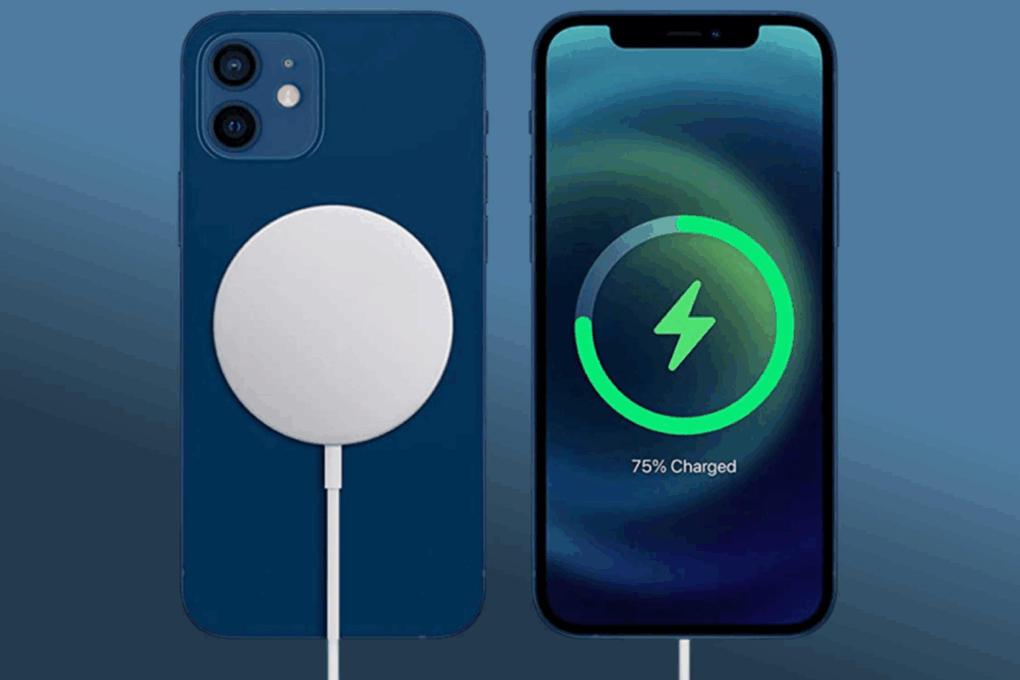
Apple MagSafe charging a blue iPhone
Score a 28% discount on this open box Apple MagSafe 1st gen charger!
Photo: Cult of Mac Deals

There are two kinds of people in the world: those who are perfectly fine untangling cords every night before bed—and the rest of us, who just want to drop the phone and walk away, knowing it’s charging.

If you’re in that second group, the Apple MagSafe Charger (1st Gen) is about to become your new best friend. And for a limited time, you can score a verified new, open-box model for just $27.99 (down from $39.99). That’s a solid 30 percent off Apple convenience, and frankly, it’s the kind of deal your nightstand’s been waiting for.

Originally released in 2020 alongside the iPhone 12 lineup, it introduced a modern spin on wireless charging. Thanks to built-in magnets, it snaps into place with just the right amount of pull—strong enough to hold on while you scroll in bed, but easy enough to lift off when you’re ready to move. The 15W fast-charging speed makes sure you don’t spend all day tethered to an outlet.

Unlike traditional wireless chargers that require you to perfectly align your phone or risk waking up to a 2 percent battery, this one locks into the ideal charging spot every single time.

Of course, it’s not just for iPhones. If you’ve got AirPods with a wireless charging case, you’re covered. It also works with newer Qi2 devices, making it future-ready.

The included 1-meter USB-C cable provides plenty of flexibility, whether you’re charging at your desk, on the couch or from that oddly positioned outlet behind your bed. For optimal performance, Apple recommends pairing it with a 20W USB-C Power Adapter (not included). However, if you already have one from your iPad or MacBook, you’re good to go.

And no, you’re not getting someone’s old charger that fell behind a dresser. These are essentially new units that were returned to the store, maybe opened, but never used. The packaging might look a little less than perfect, but the charger inside has been inspected, verified and reboxed so it’s ready to plug and play.

The MagSafe Charger is one of those underrated Apple accessories that elevate your everyday routine.

Get this new, open-box Apple MagSafe Charger (1st Gen) while it’s just $27.99 (down from $39.99).

Buy from: Cult of Mac Deals

Prices subject to change. All sales handled by StackSocial, our partner who runs Cult of Mac Deals. For customer support, please email StackSocial directly.

Build better ChatGPT prompts in seconds with this powerful AI tool for 88% off

By

Lady working with her laptop on a desk.
Save 88% on lifetime access to PromptBuilder's Unlimited Plan!
Photo: Cult of Mac Deals
If you’ve ever spent 20 minutes rewriting the same ChatGPT prompt hoping for better output, you already know how frustrating prompt crafting can be. The good news? There’s now an AI that handles that for you. It’s called PromptBuilder, and it’s built to help you talk to AI systems the way they actually understand.PromptBuilder’s job is simple: you describe what you need, and it turns that into a professional-grade prompt in seconds. The lifetime Unlimited Plan — available for $199 — gives you full, unlimited access to its complete suite of tools, templates, and optimizations.You can use PromptBuilder with ChatGPT, Claude, Gemini and other major AI models, or even generate visual prompts for DALL·E, Midjourney and Stable Diffusion. It supports over 1,000 prebuilt templates across categories like marketing, coding, SEO and research. That means less trial and error — and more getting things done.For creative professionals, it’s a major time-saver. Need an ad headline, a blog outline or an entire campaign brief? PromptBuilder optimizes your request automatically. For developers, it can help refine code, debug snippets or generate documentation. For researchers or writers, it structures queries and summaries that actually pull useful results the first time.

But it’s not just about generating text — it’s also about managing it. You can tag, save and reuse your top-performing prompts, build social media content for specific platforms or even create your own categorized library for quick reference.

Whether you’re a marketer, developer, freelancer or just someone who uses AI every day, PromptBuilder makes sure your prompts — and results — always hit the mark.

If you’re tired of guesswork and endless revisions, this might be the smartest AI upgrade you can buy.

Get lifetime access to the PromptBuilder Unlimited Plan for $199 and start building prompts like a pro.

Buy from: Cult of Mac Deals

PromptBuilder – AI Prompt Engineer: Lifetime Subscription (Unlimited Plan)

See Deal

Prices subject to change. All sales handled by StackSocial, our partner who runs Cult of Mac Deals. For customer support, please email StackSocial directly.
A new AI platform just dropped a $90 lifetime subscription

By

A woman creating content on her laptop.
Save 88% on a lifetime access of this all-in-one AI platform while it's on sale!
Photo: Cult of Mac Deals
TL;DR: 1ForAll AI is a content creation platform for generating images, text, and videos, and it’s only $90 for life.
Content creation gets messy fast when you have to jump between five different apps just to finish one project. If you write a script in one tool, generate voiceover in another then hunt down an image generator and video editor, the process becomes slow and expensive. 1ForAll AI cuts down on the chaos by putting voice, image and video creation in one place, so you can go from idea to finished content without switching tabs or juggling subscriptions. A lifetime subscription also just went on sale for $89.99 (regularly $792).

What can 1ForAll AI do?

Once you log in, you pick what you want to make and upload either a prompt, text, or a file. If you want voice narration, you paste your script and select a voice from the library. The voices come from well-known providers like OpenAI, Azure, Google and AWS, so the results sound smooth instead of monotone and robotic. If you want something personal, the voice cloning tool can create a natural-sounding version of your voice from roughly a minute of recorded audio. It supports multiple languages, so you can record once and use it across different projects.

For large-scale or repetitive work, the bulk tools save hours. The Excel-to-speech and Excel-to-image options handle high-volume projects on autopilot. If you’re building product listings, generating dozens of script variations or creating multi-file courses, the system produces everything without manual repetition. PDF-to-speech works the same way. You upload a document or long-form manuscript, and it becomes audio without copying and pasting chapter by chapter.

Image and video generation are just as straightforward. Enter a prompt, and you get AI-generated images. If you need motion, add a line of text, and 1ForAll.ai will create a moving, visually engaging video sequence. It’s simple enough for quick social content, but powerful enough for marketing assets or explainer videos.

Everything you create can be used commercially. Voiceovers, cloned voices, images and video assets are all cleared for client work, social campaigns, ads, audiobooks or course content. The system uses encrypted data handling, so documents and personal files stay private.

AI is improving, and content creators can really start to benefit.

Right now, it’s only $89.99 to get a 1ForAll AI Lifetime Subscription.

Buy from: Cult of Mac Deals

Prices subject to change. All sales handled by StackSocial, our partner who runs Cult of Mac Deals. For customer support, please email StackSocial directly.

Size matters: How to get the perfect fit for your AirPods Pro 3 ear tips

By

Closeup of the AirPods Pro 3, and their tips, on a pine table
The ear tips are a distinctive design of the AirPods Pro.
Photo: D. Griffin Jones/Cult of Mac

AirPods Pro 3’s redesigned ear tips are an unexpected hit-or-miss change. The new foam-infused tips radically change how the earbuds feel when worn.

Apple knows the ear tips are not one-size-fits-all, so the company includes five sizes of ear tips in the AirPods Pro 3 box. You can easily switch them out to find the best size for your ears.

Using the wrong size can cause problems. The earbuds can slip out if they’re too small or irritate your ears if they’re too big. They might even cause high-pitched feedback if you engage active noise cancellation with the wrong size ear tips (especially when flying).

If you don’t like how your new AirPods Pro 3 feel in the ear, don’t be hasty and return them. You should try out different ear tips first. Here are some tips to make sure you achieve the best results.

How to record spatial video on your iPhone for mind-blowing 3D memories

By

Record 3D Video
You may or may not be able to watch videos in 3D now, but you'll be glad you have it in the future.
Image: D. Griffin Jones/Cult of Mac

Your iPhone can record 3D spatial video and photos, effectively future-proofing the images you capture. And the results are stunning.

The stereoscopic 3D video and photos captured with the iPhone can be viewed on an Apple Vision Pro headset as an immersive way to relive memories.

Here’s how it works.

iPhone 18 lineup could get 24MP selfie camera

By

24MP selfie camera
Your selfies are about to get better.
Photo: Apple

Apple’s 2026 iPhone 18 lineup appears set to receive a significant camera upgrade, with all models including the first foldable iPhone expected to feature 24-megapixel front-facing cameras, according to a new report. The rumor of a better selfie camera came up with the iPhone 17 lineup, too, but didn’t materialize.

AirPods and Bluetooth speaker fighting? iOS 26.1 makes peace.

By

AirPods and Bluetooth speaker fighting? iOS 26.1 makes peace.
Your AirPods and Bluetooth speaker compete for audio coming from your iPhone. You can settle the fight.
Graphic: ChatGPT

You’re happily listening to music on your AirPods when the audio suddenly gets yanked away by a Bluetooth speaker. Don’t get frustrated. Make a quick tweak to the settings on your iPhone running iOS 26.1, and it’ll never happen again.

Here’s what to do.

Take great surround sound on the go with Treblab’s killer speaker [Review] ★★★★☆

By

Treblab HD-360 Pro speaker review★★★★☆
With 360-degree surround sound, Treblab's HD-360 Pro wireless speaker sounds great indoors or out.
Photo: David Snow/Cult of Mac

After spending quality time with the Treblab HD-360 Pro, I’ve come to appreciate what this Bluetooth speaker represents: excellent audio that’s good enough for home use but just happens to be wireless for portability — unlike Apple’s excellent-but-limited HomePod 2.

In a market saturated with speakers that promise much but deliver mediocrity, HD-360 Pro stands out by focusing on what matters most — genuine audio quality backed by serious hardware. And at roughly half the price of great home speakers like HomePod 2 but with the option of portability, it’s worth considering, depending on what you want in a speaker. 

How to turn off Liquid Glass in iOS 26.1 if you hate it

By

Turn off Liquid Glass
You can easily deactivate Liquid Glass in iOS 26 and macOS Tahoe if you really can’t tolerate it.
Photo: Gemini/Cult of Mac

Liquid Glass in iOS 26 brings dramatic change to the look of the iPhone user interface, so it’s no surprise that some people hate it. If it’s just not for you, the option to turn off Liquid Glass was added in iOS 26.1. And it’s easy.

The same setting is available in macOS Tahoe 26.1 and iPadOS 26.1, so you can turn off Liquid Glass on all your devices. Here’s how:

Apple quietly added this awesome feature in iOS 26.1

By

The best iOS 26.1 feature you probably haven’t noticed yet
Apple made a simple change in iOS 26.1 that you’ll probably love.
AI image: ChatGPT/Cult of Mac

My favorite change in iOS 26.1 has nothing to do with Liquid Glass, though cosmetic tweaks to the glossy user interface have drawn the most attention in the latest OS update. To me, the biggest improvement is the option to disable the Lock Screen swipe to open the iPhone’s Camera app.

I frequently pull out my iPhone to find the Camera app has been running in my pocket, draining the battery. It’s that damn Lock Screen swipe at fault. If this happens to you, too, here’s how to disable it in iOS 26.1.

Apple’s upcoming budget laptop has PC makers ‘freaking out’

By

Apple developing low-cost laptop
A new budget MacBook might not look much different from this M1 MacBook Air. And the new Mac's iPhone processor may outperform the M1 chip.
Photo: Cult of Mac Deals

Apple is working on its first low-cost laptop, a strategic departure from its traditional premium approach that could shake up the education and entry-level PC markets, according to a new report. And some responses on social media suggest the PC industry is, indeed, “freaking out” over it.

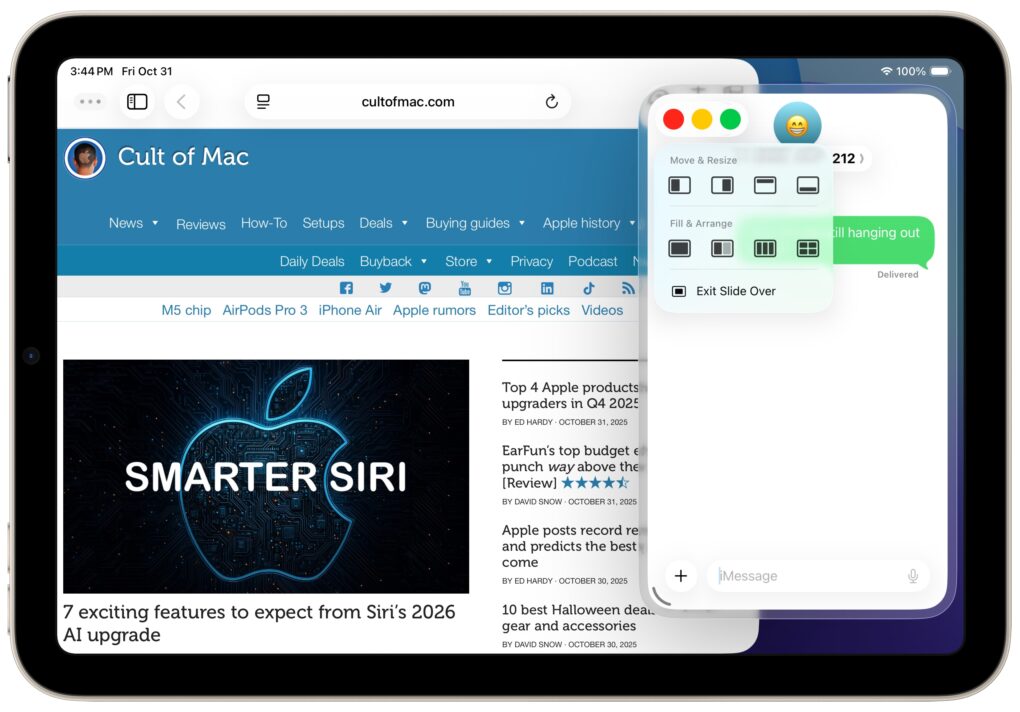
Thank goodness Slide Over is back in iPadOS 26.1

By

Toggling Slide Over on the iPad
Slide Over multitasking returns to iPad!
Screenshot: D. Griffin Jones/Cult of Mac

Slide Over, one of the best iPad multitasking features, got rescued from the rubbish heap with the new iPadOS 26.1. It’s an ideal way to keep an application that you check frequently but not constantly within easy reach — it’s offscreen but accessible with just a flick of a finger.

Here’s how to use Slide Over, and why you shouldn’t ignore the option now that it’s back in iPadOS 26.1, which launched on Monday.

5 new features in iOS 26.1 you don’t want to miss

By

iOS 26.1 Update: Top 5 Features
The best new features in the latest update.
Image: D. Griffin Jones/Cult of Mac

iOS 26.1, which Apple released Monday, brings five features you should check out immediately after you install the update.

The biggest change gives you a way to customize the legibility of Liquid Glass, the major user interface overhaul Apple delivered to all its software platforms this year. But there’s plenty of other cool stuff you don’t want to miss.

Other key upgrades come to Apple Music and the iPhone’s alarm clock interface. Plus, there’s a setting that can keep your iPhone battery from draining in your pocket. And for iPad owners, there’s the celebrated return of Slide Over on iPad.

7 exciting features to expect from Siri’s 2026 AI upgrade

By

Siri 2026 AI upgrade
Tim Cook confirmed AI-enhanced Siri should arrive in 2026. Here's a reminder of what that will mean.
AI image: ChatGPT/Cult of Mac

Apple’s long-delayed AI-powered Siri upgrade remains on track for a 2026 debut, CEO Tim Cook said Thursday. That offers some reassurance to users after multiple setbacks pushed the originally planned 2024 release back by more than a year.

So, what can we expect from a smarter Siri voice assistant when it finally arrives? 

3 reasons to watch Down Cemetery Road on Apple TV

By

Down Cemetery Road review
New Apple TV thriller Down Cemetery Road is a compelling whodunnit (and who did what, exactly?).
Photo: Apple TV

New Apple TV crime thriller Down Cemetery Road, based on British author Mick Herron’s debut novel, might not always match the fast-and-dirty fun of Slow Horses, the hit stablemate also derived from Herron’s work.

However, it offers enough intrigue, stellar performances (especially from star Emma Thompson) and dark humor to deserve your attention. 

Here’s why you should stream the eight-episode conspiracy thriller.

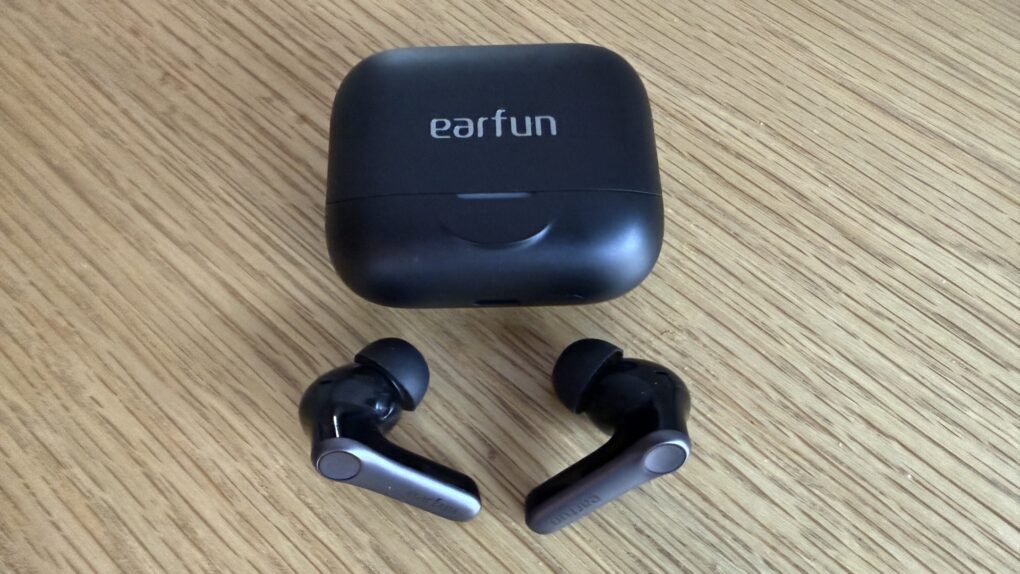
EarFun’s top budget earbuds punch way above their weight [Review] ★★★★

By

EarFun Air Pro 4 Plus with closed case★★★★
For under $100, EarFun Air Pro 4 Plus are killer.
Photo: David Snow/Cult of Mac

The budget wireless earbuds market has become increasingly competitive, but this EarFun Air Pro 4 Plus earbuds review finds they manage to stand out with a compelling combination great sound, premium features and aggressively good value. Priced at $100 — with a launch discount coupon on Amazon bringing it down to about $80 —  these earbuds challenge what we’ve come to expect from the sub-$100 category. And they do so while going toe-to-toe with Apple’s $249 AirPods Pro 3.

Apple posts record revenues — and predicts the best is yet to come

By

Colorful, stylized AI image of the Wall Street bull rampaging on a brick street, with the Apple logo in the sky above it.
Apple beat Wall Street expectations yet again, and set records in some important categories.
AI image: Midjourney/Cult of Mac

Apple set a new record for iPhone revenue in its most recent financial quarter. Total company revenue reached $102.5 billion, an 8% increase over the same quarter of last year. And earnings per share hit $1.85, a rise of 13%, the company said Thursday.

Plus, Apple CEO Tim Cook predicted the current quarter will be “the best ever in the history of the company” — and AAPL’s stock price shot up in after-hours trading.

10 best Halloween deals on Apple gear and accessories

By

Halloween sale on Apple
You can get some scary-good deals on MacBooks, iPads, chargers and more.
AI image: ChatGPT/Cult of Mac

Halloween may not be as big a shopping event as Black Friday or Amazon Prime Day, but you can still scare up some spooktastic deals on Apple gear and accessories for various Apple devices. We hunted down 10 must-see bargains on MacBooks, iPads, AirTags, chargers, power stations, headphones and speakers. 

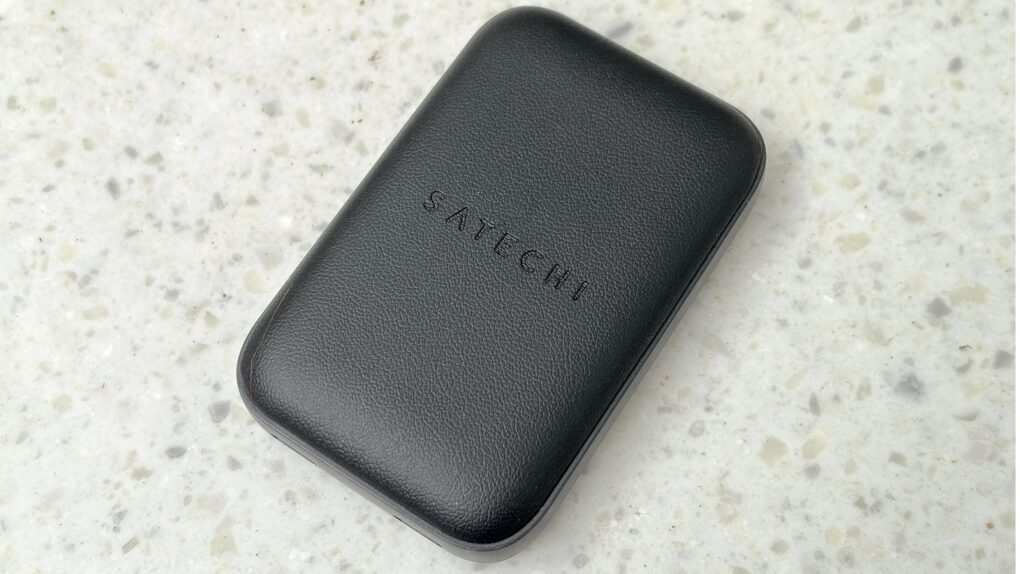
Slim wall charger blows away anything from Apple [Review] ★★★★

By

Satechi OntheGo 67W Slim Wall Charger review★★★★
The Satechi On-the-Go 67W Slim Wall Charger packs outsized power.
Photo: Ed Hardy/Cult of Mac

The Satechi OntheGo 67W Slim Wall Charger lives up to its name. It’s sleek and very portable, but can pump out enough power to juice up a MacBook. It makes anything from Apple seem bulky, slow and limited.

I tested out its capabilities for this hands-on review.

Mind behind Slow Horses brings thriller Down Cemetery Road [Now streaming!]

By

Down Cemetery Road season 1
Watch the trailer below.
Photo: Apple TV+

As Slow Horses season 5 wraps up with its sixth episode Wednesday, Apple TV cues up a second thriller, Down Cemetery Road, in collaboration with novelist Mick Herron. You can watch its first trailer below, or jump right into the first two episodes. The new series stars Academy Award winner Emma Thompson and Golden Globe winner Ruth Wilson. It’s based on Herron’s “Zöe Boehm” book series.

Reviews of Down Cemetery Road so far seem thrilled with the show. “If you like Slow Horses, you’ll love conspiracy thriller Down Cemetery Road,” raves Time magazine. It “hits the sweet spot of thrills and odd-couple comedy,” adds AV Club. Critics call Thompson’s performance “magnificent” and “superb,” among other superlatives.

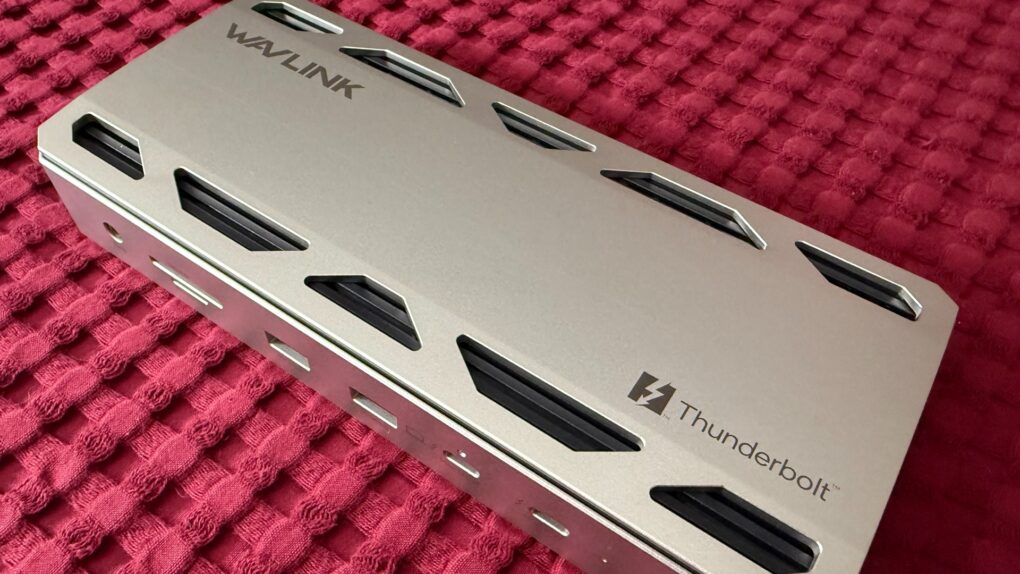
Wavlink Thunderbolt 5 dock blazes through data transfers and brings big laptop power [Review] ★★★★☆

By

Wavlink Thunderbolt 5 dock★★★★☆
Wavlink Thunderbolt 5 dock
Photo:

The Wavlink Thunderbolt 5 Docking Station (WL-UTD58) heralds the company’s ambitious entry into next-generation connectivity. It offers users impressive charging power and access to remarkable data-transfer speeds in complex computer setups. I tried it in my dual 5K-display M4 MacBook Pro workstation — and found it excellent. Not perfect, but excellent. 

Hands-on with new ChatGPT Atlas browser: Safari is falling behind fast

By

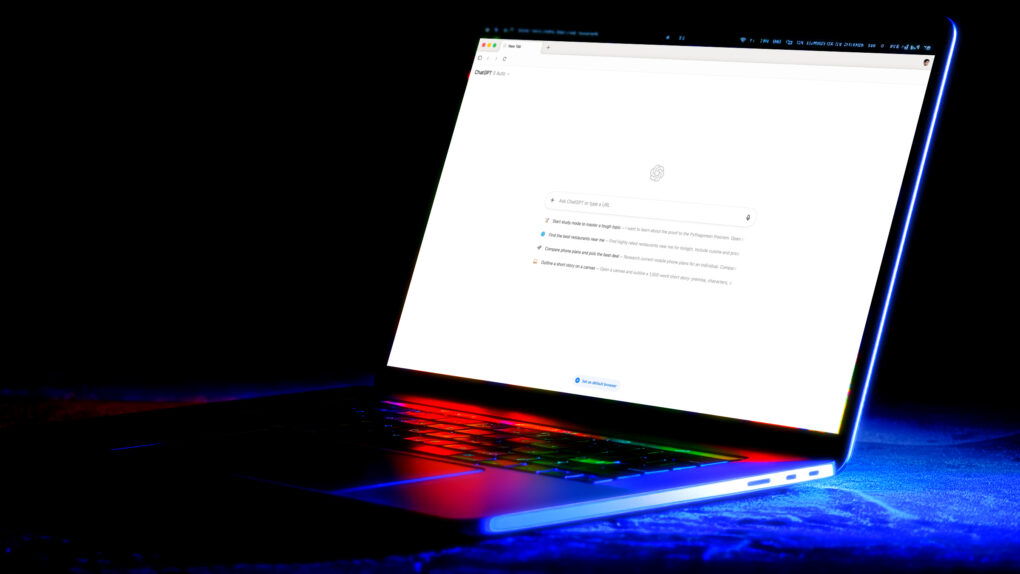
AI image of a MacBook Pro with the ChatGPT Atlas browser on its screen, in a dimly lit room with UV lights.
ChatGPT Atlas and other AI-enhanced web browsers might eat Safari's lunch.
AI image: Midjourney/Cult of Mac

Going hands-on with the new ChatGPT Atlas browser for Mac makes it crystal clear that Safari risks becoming irrelevant. Our browsing habits are evolving fast, and Apple’s browser just isn’t keeping up

For years, Safari has been my go-to browser on the Mac due to its speed and power efficiency. But with Apple falling behind in the artificial intelligence wars, and a new breed of AI-boosted browsers coming on strong, that could change. I went hands-on with ChatGPT Atlas to see what the future of internet browsing looks like.

AI jokers take Vision Pro’s new headband to wild extremes

By

AI-generated image of a samurai armored warrior in the style of an Apple Vision Pro strap
This goes way beyond a headset strap.
AI image: @jmdagdelen/X.com

The internet is going crazy over the Apple Vision Pro’s new Dual Knit Band, with AI users creating increasingly fantastical mutant versions of the distinctive-looking strap.

The craze started with people turning the white knit headband into a head-covering hat, but kicked into overdrive after X.com user John Dagdelen posted an image Sunday of a samurai warrior dressed head-to-toe in Vision Pro-inspired armor.

“We are not thinking big enough,” Dagdelen said in his X.com post. Dagdelen, founder of the Fluid operating system for VR headsets, who said he used ChatGPT to create the Vision Pro samurai image.

His AI creation clearly inspired others to think bigger … or at least weirder.

A wild array of AI creations followed, including some that animated Dagdelen’s samurai. The jokesters envisioned all sorts of bizarre designs and uses, from Star Wars characters to high-fashion gowns and handbags. There’s even an automotive design where the lenses make up a car’s front grill and headlights.

“There are some pretty creative ones,” Dagdelen told Cult of Mac.

The M5 Vision Pro is still the ultimate entertainment device [Review] ★★★★☆

By

M5 Vision Pro sitting on its box on a pine table★★★★☆
The box makes for a good display stand.
Photo: D. Griffin Jones/Cult of Mac

The new M5 Vision Pro brings a huge leap in compute power and graphics performance to Apple’s novel mixed-reality platform. The tweaks to the formula deliver better graphics and passthrough video, and longer battery life — plus a more comfortable head band in the box. Unfortunately, it doesn’t include more storage or a lower price.

Apple doesn’t appear to be pushing M2 Vision Pro owners to upgrade. I wouldn’t, either. Rather, if you’re still Vision Pro-curious — and you’ve been pinching your pennies for the past year and a half — the Vision Pro you buy today will be a bit better.

I quickly fell in love with the original Vision Pro. Here’s what I think of the new one.